
Manage your entire team from one place

Employee registration, employment contracts, roles and permissions, bulk CSV import and automatic onboarding. Everything you need to manage your workforce.

Try for free✓ 15 days free  ·  No card required
Manage your entire team from one place

Employee registration with automatic onboarding

Register new employees in minutes. JornAda automatically sends the welcome email with credentials and the downloadable app.

Bulk import via CSV

Import your entire workforce at once from a CSV. Preview before confirming, row-by-row error handling and duplicate validation.

Employment contract management

Create and manage each employee's contracts with start and end dates. Full history, overlap detection and expiration alerts.

Configurable roles and permissions

Assign Employee, Company Admin or Superadmin roles. Control what each user can see and do on the platform.

Multi-site management

Organize your team by sites with their own local holidays. Perfect for companies with employees in multiple locations.

Integrated onboarding tutorial

New admins follow a step-by-step tutorial to set up the company, add employees and start using the platform.

How it works

How team management works in JornAda

  1. You add the person

    Name, role and at least an email or an ID number. JornAda creates their contract and their document folder, and sends the welcome email.

  2. You group people into teams

    Each team has a name and a leader. A person belongs to one team only, and it warns you before moving them to another.

  3. You delegate permissions over that team

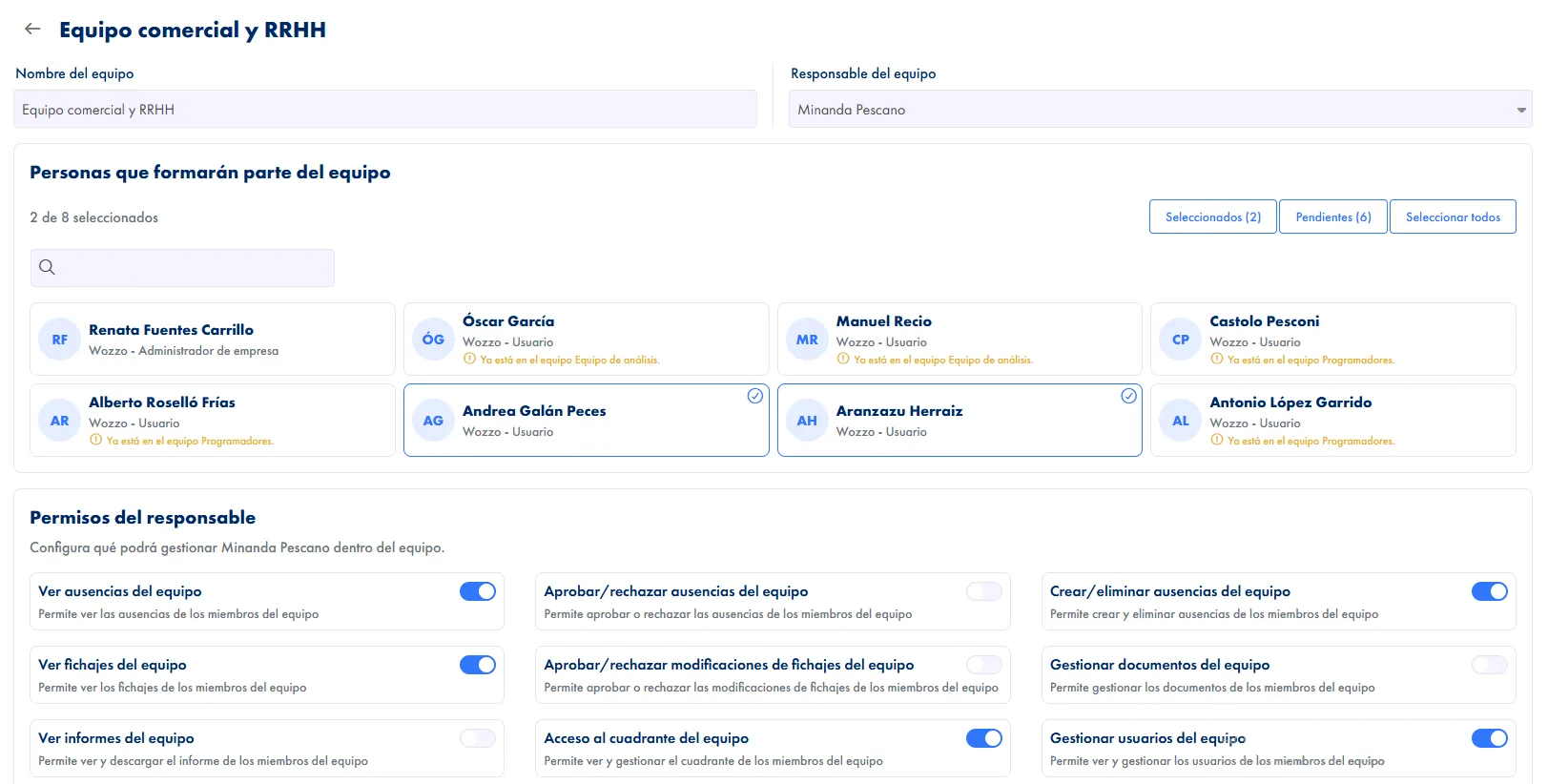
    Eight switches, one per permission, each with its description underneath. They are granted per team, not per person.

  4. The permission decides what data they see

    A permission resolves into the exact list of people that leader can look up. Outside that list, they get nothing back.

The eight permissions are granted per team

Viewing absences, approving them, creating them, viewing clock-ins, approving corrections, access to the team grid, managing users and managing documents. They live on the team, not on the person, so someone can lead the shop floor with approval rights and the warehouse with view-only. The system roles are three and are not built to order.

The eight permissions are granted per team

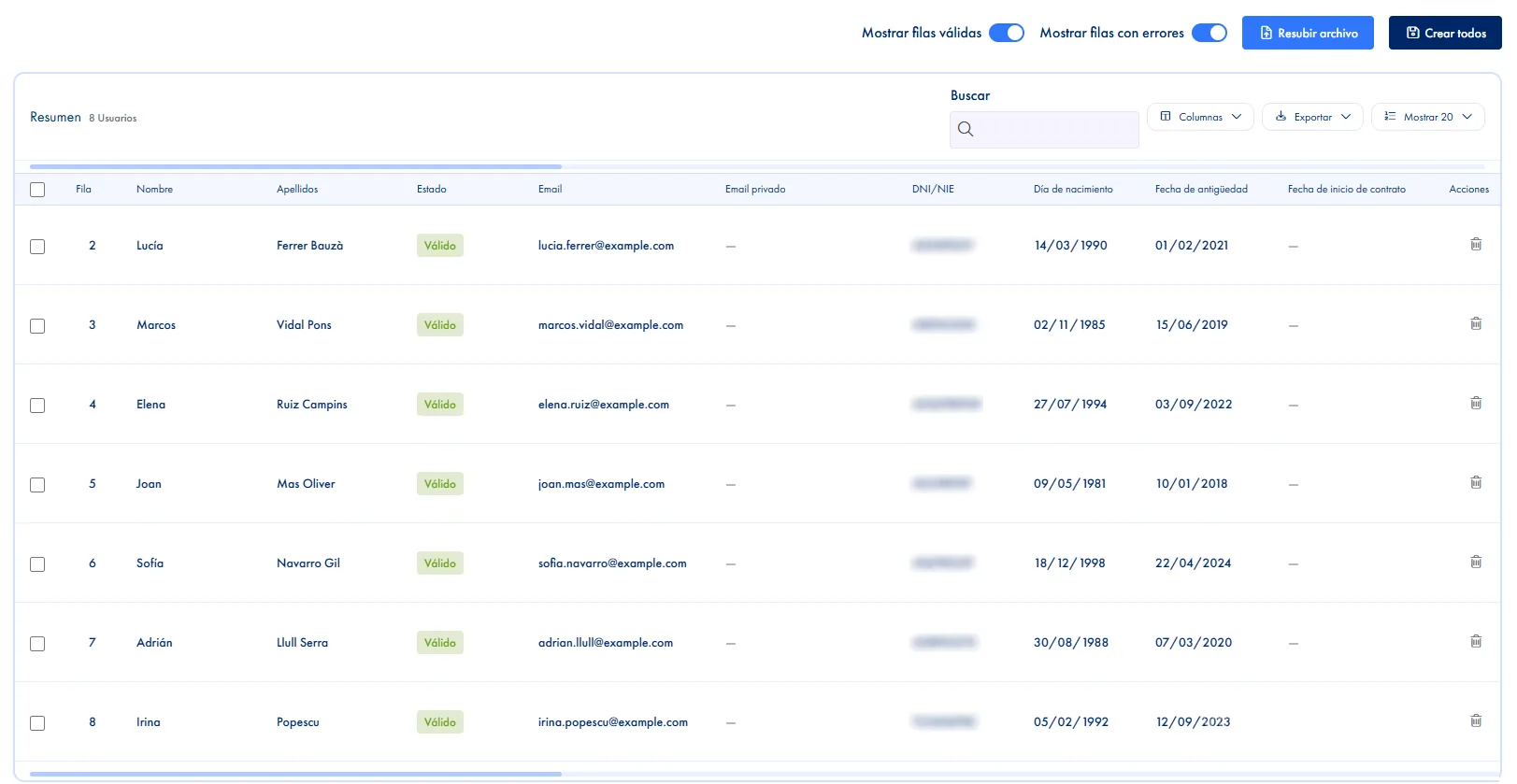
Bulk import forgives your column names

CSV or Excel with twenty fields, of which only three are required: first name, surname and ID number. And the headers do not have to be named a particular way: the social security number is recognised under twelve different names and the ID under nine. If a required one is missing but a similar column exists, the error tells you which one to rename.

Bulk import forgives your column names

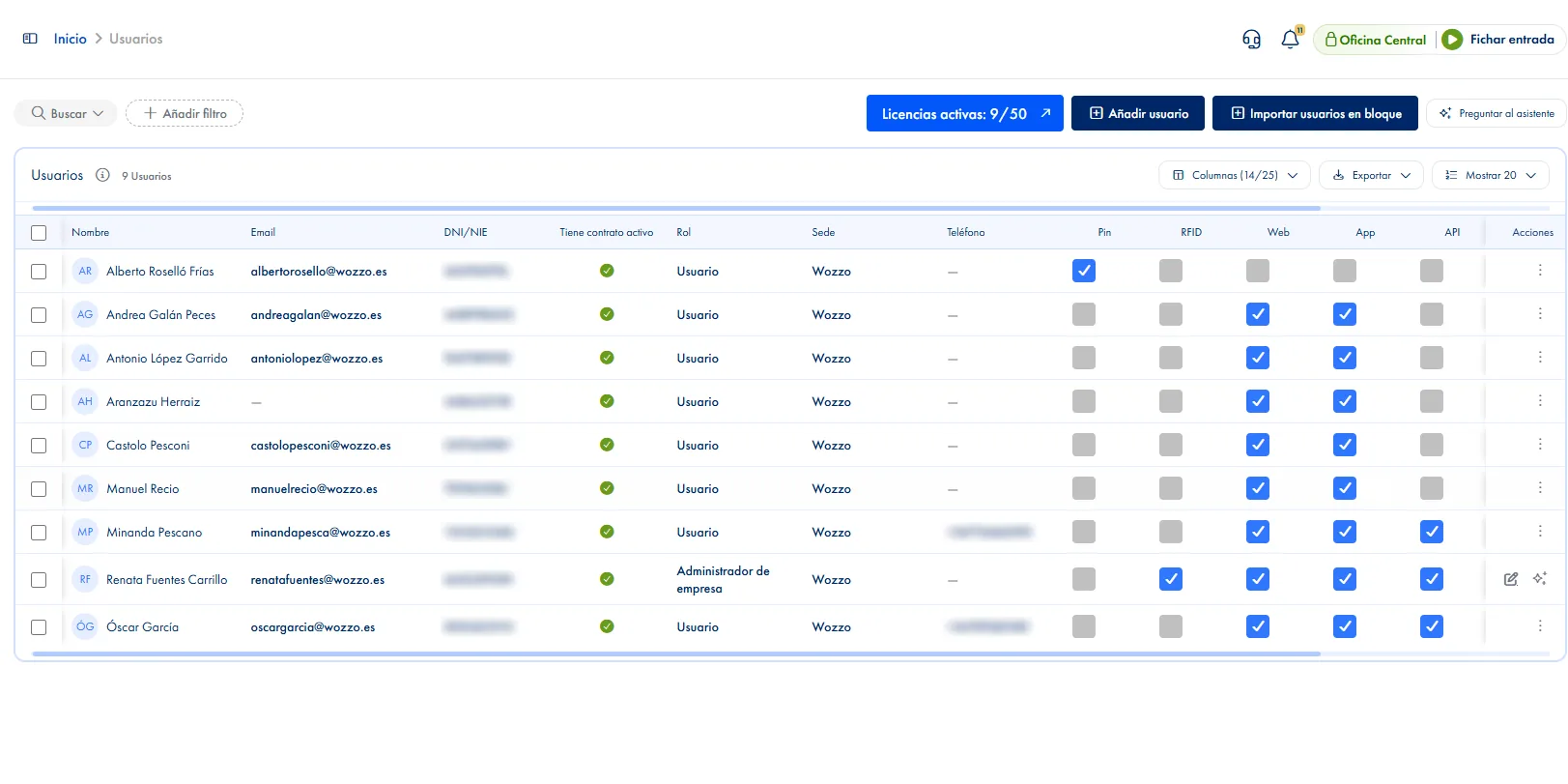
The user list does the day's work

Twenty-eight columns, six filters and a search that looks at name, email, ID, phone and social security number. Five columns are editable without opening the record, among them which clock-in methods each person is allowed. ID expiry is highlighted in red or orange, and you can add your own expiry alerts for a licence or certificate, with up to seven lead times.

The user list does the day's work
Common questions

Frequently asked questions about team management

Can't find your answer?

Write to us and we will help you sort it out.

Contact us

Yes, and with different permissions in each, because permissions live on the team. As a member, though, each person belongs to one team only: adding them to another warns you before moving them. If a team is deleted, its members are not deleted, they are left without a team.

No. There are three fixed roles: super admin, company admin and employee. What you do adjust is what a leader can do inside each of their teams, with the eight delegable permissions. One useful warning: managing users grants access to the org chart, not to the user list.

Their own and those of the members of the teams they lead with that permission. If they look up someone outside that set, they get no data. It is deliberate: silently narrowing the query would hand them a result they did not ask for while they believed they had.

The header counter shows active against the limit and the add and import buttons are disabled. Deactivating an employee frees their licence and keeps all their history. Raising the licence count is not self-service: you ask Support.

Name, role and at least an email or an ID number. If you do not pick a site, they get the company's first one, and nobody can create someone with a role above their own. Saving creates their initial contract and sends the welcome email, plus an SMS if there is a phone number.

Yes, in CSV or Excel. Only first name, surname and ID number are required; the rest of the twenty fields are optional. It runs in two steps, with a preview that validates before you confirm, so errors show on screen rather than afterwards. And the headers do not have to be named a particular way: if a required column is missing but a similar one exists, the error tells you which to rename instead of leaving you guessing.

To be added and to have a schedule assigned. When you create the person, JornAda makes their initial contract and their document folder, and sends the welcome email with the app download links, plus an SMS if you entered a phone number. Without a contract, absences cannot be requested, holidays are not calculated and that person does not appear in reports, so the contract is the part you cannot skip.

Yes. ID expiry is highlighted in the list by itself, red once it has passed and orange when less than three months are left. And you can add your own expiry alerts, for a driving licence or a certificate, with up to seven lead times running from fifteen days to six months. The alert goes out by email and notification to the employee, and by email to admin and to their manager.

You deactivate them, and that frees their licence without losing any of their history: the clock-ins, the absences and the documents are all still there, which is what you need if someone asks about a past period. The licence counter in the header reflects it straight away, so the seat is free for the next hire. And the list can be filtered by contract about to expire so you are not caught late.

Yes, and change it without opening each record. The list has five editable checkboxes per person: PIN, card, web, app and API, so allowing or blocking a method is one click. The last access column says explicitly when someone has never logged in, which is how you spot whoever has not started using it. And the list exports to CSV and PDF with the columns you have on screen.

Centralize your workforce management

Employee registration, employment contracts, roles and permissions, bulk CSV import and automatic onboarding. Everything you need to manage your workforce.