Your team's emotional pulse, in real time

JornAda includes an anonymous emotional clock-in system that lets you know your team's mood every day, detect trends and act before problems escalate.

Try for free✓ 15 days free  ·  No card required
Your team's emotional pulse, in real time

Emotional check-in at clock-out

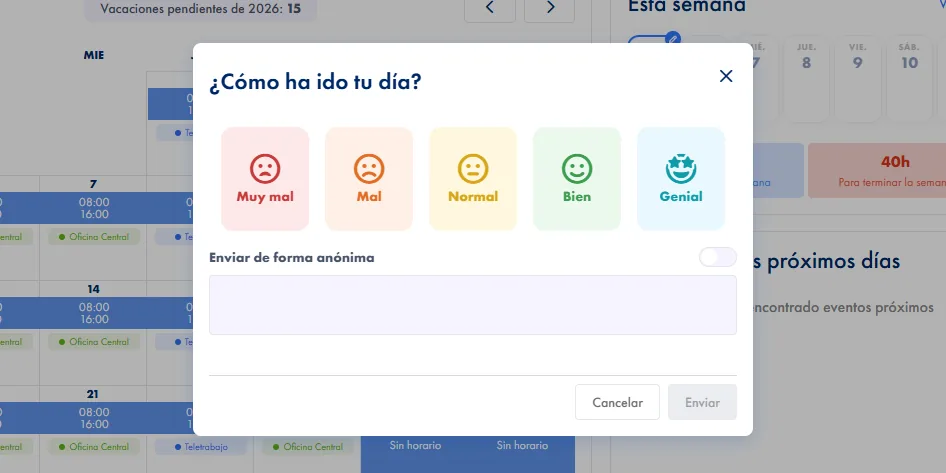
At the end of the shift, the employee rates their mood on a 5-level scale: Very bad, Bad, Normal, Good or Great.

100% anonymous responses

The employee can mark their rating as anonymous. Admins see team trends without identifying anyone.

Team satisfaction dashboard

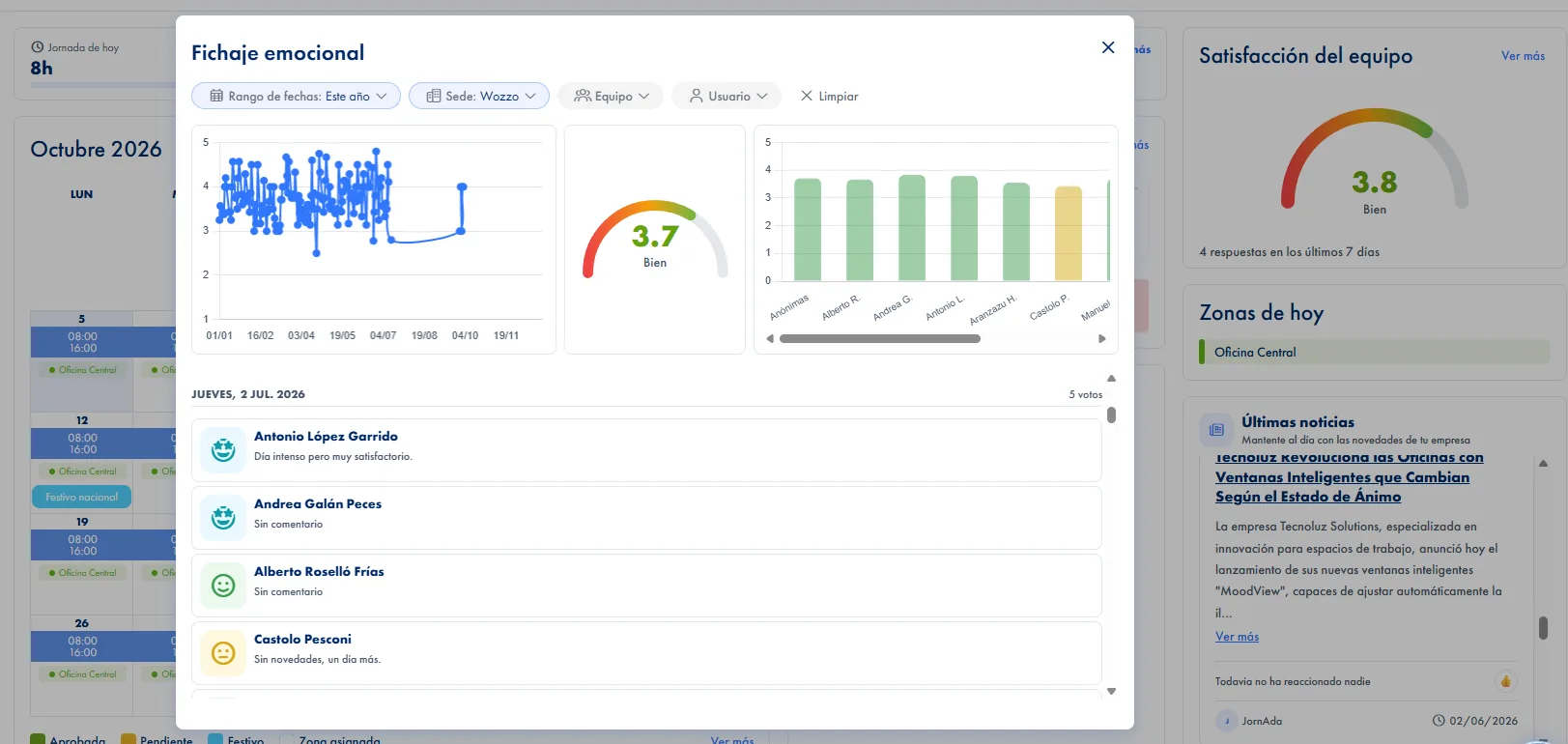
Visual panel with the average satisfaction for the last 7 days, trend charts and weekly response count.

Early problem detection

Detect satisfaction drops before they become turnover, stress-related sick leave or conflicts. Act at the right moment.

Optional comments

Employees can add a free-form comment with their rating for more context. Anonymous if they prefer.

Key differentiator for large companies

Companies that measure wellbeing reduce turnover and improve productivity. JornAda connects daily clock-ins with real wellbeing.

How it works

How the daily mood check works

  1. You switch it on, when you want to

    It ships switched off. You turn it on with a switch in company settings, or straight from the card on the dashboard.

  2. The question appears at clock-out

    "How was your day?" and five faces. Only on clocking out, and it can be closed without answering: the clock-out is already saved.

  3. One answer per person per day

    One answer per person per day. They can add a comment and mark the answer anonymous.

  4. You get the gauge, and an email every Monday

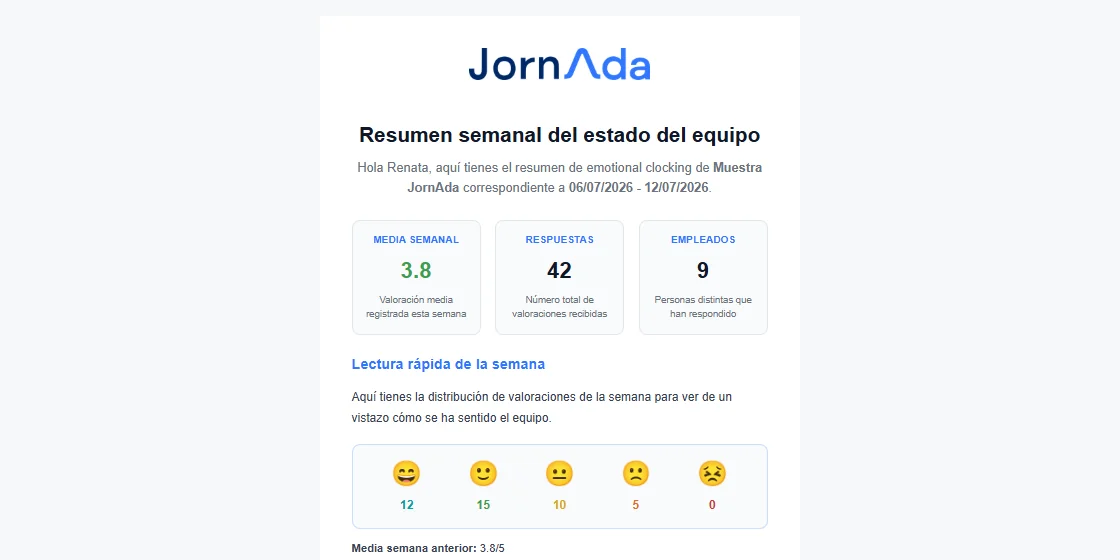
    The dashboard shows the average of the last 7 days. And every Monday at 9:00 the week's summary arrives by email.

It asks while people are there, not in a separate survey

What separates this from a climate survey is timing: the question comes up as they clock out, while the day is still fresh in their head. No link to open and no password to remember. And it never blocks the clock-out: the clock-out is saved first and the rating comes after, so nobody is left waiting at the door.

It asks while people are there, not in a separate survey

What admins see

A dashboard card with the average of the last 7 days and how many answers hold it up, the colour changing with the value. See more opens the trend, the gauge and the average per person, which is where you see whether one team or one person is pulling it down. Below that, the reviews by day; anonymous ones show as Anonymous.

What admins see

The Monday summary

Every Monday at 9:00 admins get the week's average, how many people took part, the histogram of the five ratings, the previous week's average to compare against and the first written reviews. It reads in two minutes. And if there was not a single answer that week, nothing is sent.

The Monday summary
Common questions

Frequently asked questions about team wellbeing

Can't find your answer?

Write to us and we will help you sort it out.

Contact us

It is anonymous to whoever reads it: neither the dashboard nor the Monday email shows the name. But let us be precise: JornAda still stores internally who each rating belongs to, because that is what stops anyone voting twice in a day. It is not cryptographic anonymity and we do not sell it as such.

No. The average and the reviews require the company admin role. Among the eight permissions that can be delegated to a team leader there is no wellbeing permission, so a team leader cannot see how their people scored the day.

No, and that is deliberate. The question closes without an answer and the clock-out is already saved, so nobody misses a clock-out over not wanting to rate the day. A forced answer would not tell you much anyway.

It is a single question on a 1 to 5 scale at clock-out, with an optional free comment. In exchange for that simplicity you get something a quarterly survey cannot give you: a daily series, answered by people who were already in front of the screen.

There is no automatic alert when the average drops. You see the drop in the dashboard gauge, in the trend chart and, above all, in the comparison against the previous week that the Monday email carries. Action plans come from your company, not from the tool.

One tap. Five faces appear and they press one; if they want to add something, there is an optional free comment and a box to send it anonymously. It can be closed without answering, and the clock-out is already saved, so nobody misses a clock-out over not wanting to rate the day. At the shared terminal by the door they only tap the face, with no comment and no box: it is a device with people waiting behind.

Once a day at most, and only on clocking out, not on every clock-in. If that person has already answered today, they are not asked again. What builds up is something a quarterly survey cannot give you: a day-by-day trend, answered by people who were already in front of the screen with the day still fresh.

That is what the average-per-person chart in the detail is for: it is where you see whether one team or one person is pulling the average down, instead of being left with a single global figure that does not tell you where to look. The detail has three periods, the last seven days, this month and this year, with the reviews grouped by day underneath.

No. Having the wellbeing question switched on is enough: every Monday at nine, admins get the previous week's summary, Monday to Sunday. It carries the average, how many people took part, the spread of the five ratings, the previous week's average to compare against and the first written reviews. And if there was not a single answer that week, nothing is sent: an inbox full of empty emails is the fastest way to make a metric stop being read.

No, and it does not try to. It is a single question on a one to five scale at clock-out, with an optional free comment. There are no configurable questionnaires, no eNPS, and no action plans or follow-up inside the tool: your company brings those. In exchange you get a daily trend instead of a snapshot every quarter, which is what lets you notice a drop while there is still time to ask someone about it.

No. An employee answers and that is where it stops: they do not see their team's average or anyone's replies. The average and the reviews belong to company admins, and there is no separate wellbeing screen anyone can wander into: it lives inside the dashboard, alongside the rest of the day's metrics. Admins have it in the app's home too, with weekly, monthly and yearly filters.

Do you know how your team feels today?

JornAda includes an anonymous emotional clock-in system that lets you know your team's mood every day, detect trends and act before problems escalate.